
KERMEZ / 04 / PRODUCT STUDIO
Implemented custom productKermez Operations Center
The menu for the customer.
The workflow for the team.
A custom workspace connecting menu administration with daily cafe operations. Eleven modules cover the daily overview, orders, customers, menu, inventory, expenses, tasks, reports, team, activity and settings.
Cafe managers, operations staff and menu administrators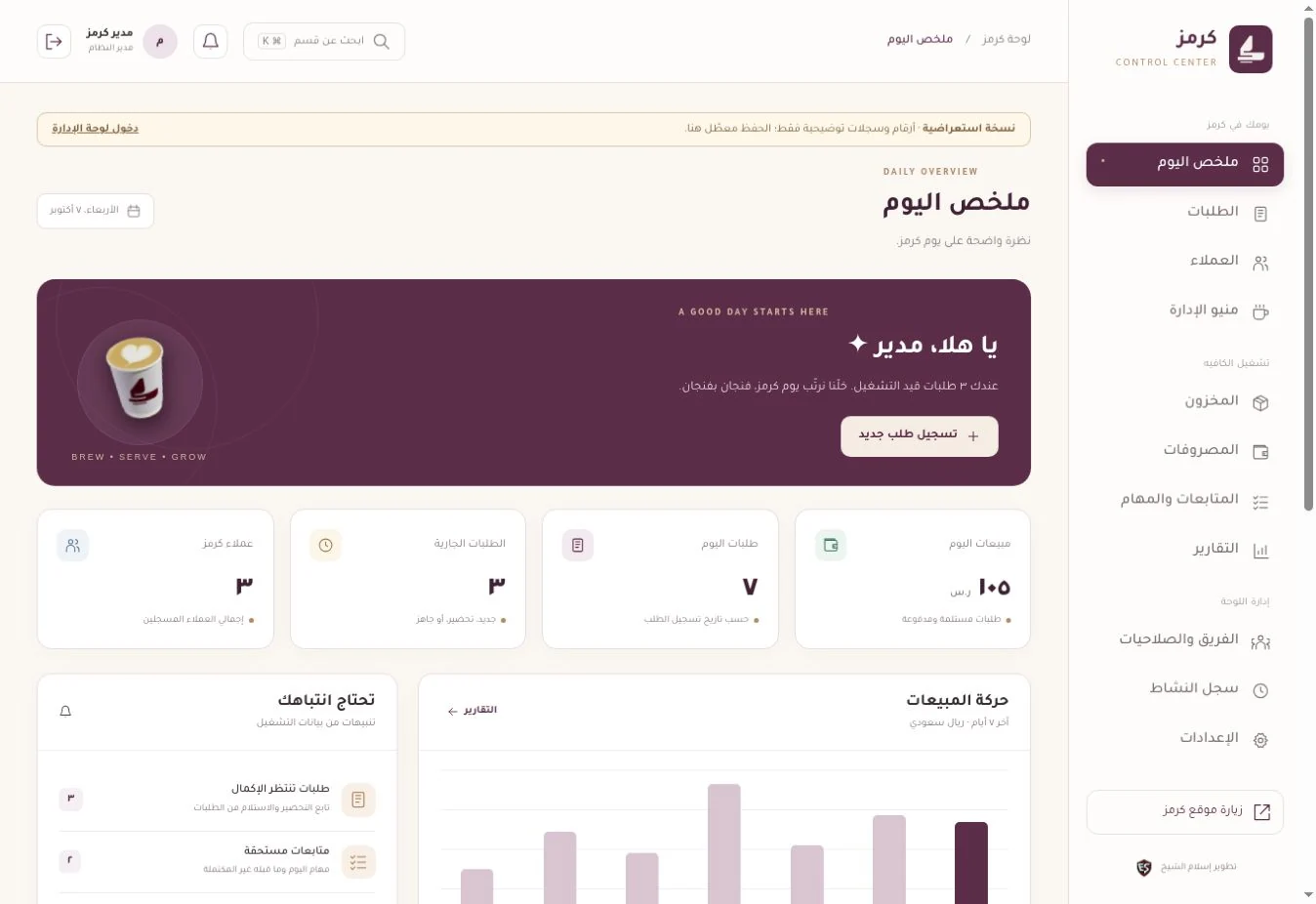
01 / WHY THIS PRODUCT
An administered menu. Recorded, owned operations.
Menus change, orders need follow-up, and stock and expenses need clear records. The product brings these workflows into an Arabic workspace with staff roles and controls for the published menu.
- 01Staff update an item
- 02It appears in the public menu
- 03Orders and follow-ups are recorded
- 04Operations records are reviewed
02 / INSIDE THE PRODUCT
See how the work connects.
Choose a view to inspect the interface and its role in the workflow. All images use demonstration data.
The day's picture before opening records.
Captured from the actual public demonstration, showing module navigation and the daily overview. Its figures and customers are illustrative; saving is disabled.
- Eleven modules in one workspace
- Overview and routes to orders and follow-ups
- Clearly labelled demonstration data
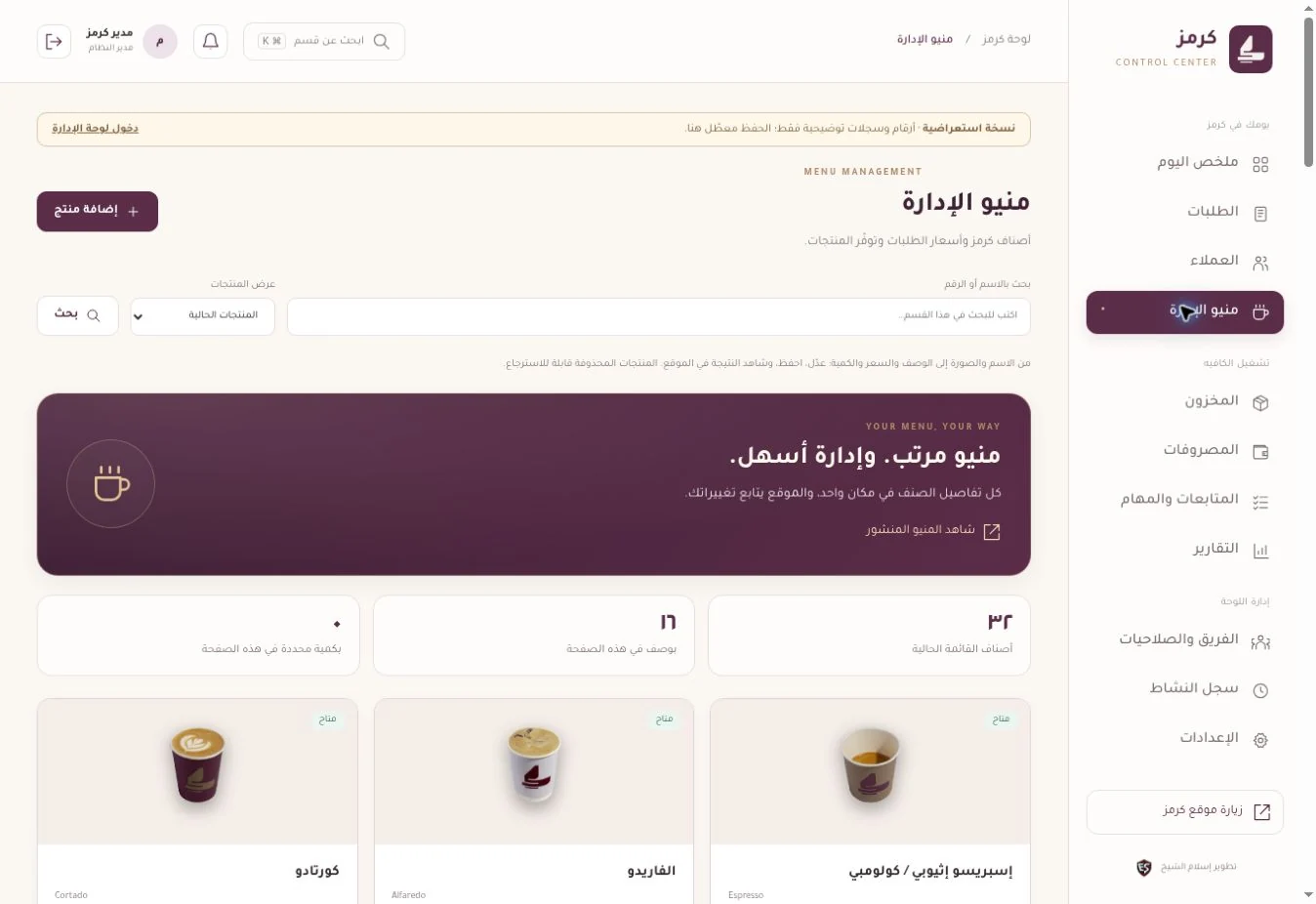
Inspect the full interfaceManage item details in one place.
An interface for item imagery, names, prices and availability. This view shows demonstration records; the published menu can be inspected separately on the cafe website.
- Imagery, description, price and category
- Publication, archiving and restoration
- A public menu linked to product administration
 Inspect the full interface
03 / PRODUCT CAPABILITIES
Details that serve the workflow.
Cafe menu and operations
Menu administration
Edit names, categories, imagery, descriptions, prices and availability; archive or restore items and publish menu updates.
Orders and customers
Connected areas for recording orders, customer details and follow-up state.
Stock and expenses
Separate stock and expense records alongside the daily overview and reports.
Tasks and reports
Team tasks and follow-ups, with reports for reviewing the records entered in the workspace.
Team and roles
Manage staff and access roles, with activity and settings areas.
Customer experience
A photo menu with search and six categories, the Karmouza assistant, and a form preparing a WhatsApp booking enquiry.
ASK THE EXPERIENCE / 06
Ask a better question.
See the practical answer.
Six practical answers about Kermez Operations Center, its workflow, connections and delivery scope.
Return to the interface tourExplore the CRM service studio01Can staff update the public menu from administration?
Staff can edit item names, categories, images, descriptions, prices and availability, archive or restore items, and publish menu changes through a defined administration flow.
02How do the modules support cafe operations?
Eleven modules cover overview, orders, customers, menu, inventory, expenses, tasks, reports, team, activity and settings. They organize the information staff record for operational review.
03Does the booking form automatically create a confirmed reservation?
The form prepares a WhatsApp booking enquiry requiring staff response and confirmation. In the current scope it does not automatically insert a booking into the operations workspace.
04How are staff access and changes managed?
Team, role, activity and settings areas support staff administration. Access is configured against responsibilities so product and operational information stay within the appropriate workspace.
05Can I change records in the public demo?
The public walkthrough uses illustrative records and disables saving. Actual operation and changes require authorized staff access to administration.
06Do the displayed reports prove cafe sales?
Demo figures are not actual business sales. Reports show how records are reviewed; operational conclusions require real, complete business records.
No matching answer. Try another phrase or browse all questions.
The product's delivery stage and scope.
An implemented custom product, with the published version reviewed on 7 October 2026. The public demo uses illustrative records and disables saving. The booking form prepares a WhatsApp enquiry requiring cafe confirmation; it does not automatically create a booking in the workspace. Demo figures are not business performance results.
LET'S DESIGN YOUR WORKFLOW
Need a clearer menu and operations workflow?
Define menu updates, order intake and staff responsibilities, then build the modules your operations need.