
ESLAM ELSHIKH / SYSTEMS STUDIO
CRM for your business.
Try it with your team.
A working custom trial with your identity, roles and workflow. Let your team test the agreed tasks before deciding on the full build. Explore delivered interfaces, then shape a trial around your business.
An interface you can inspect. A workflow you can understand.
CRM / EXPERIENCE GALLERY
See the system.
Understand the workflow.
Choose a business close to yours. Explore its screens, inspect the details, then shape a trial for your team.
- Experiences
- 05
- Interface views
- 11
Healthcare centers
Sama Scan Control Center
An Arabic workspace connecting examination requests with contacts, appointments, and follow-ups. It brings website enquiries into a structured reception and operations workflow.
Reception, center managers, relationships and marketing teams
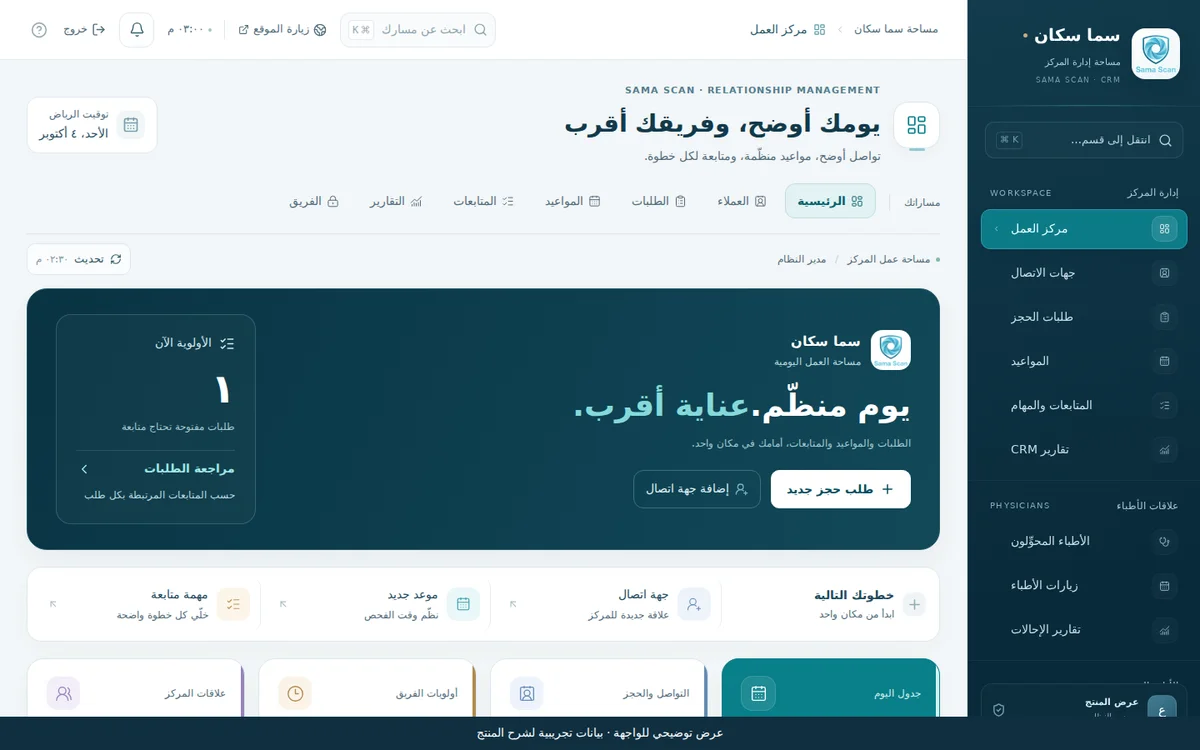
Start with the work that needs attention.
The opening view brings open requests, appointments, and urgent tasks together. Reception can move into a request or task from this starting point.
- Daily request and task summary
- Direct navigation across operations
- A separate physician-relationships area
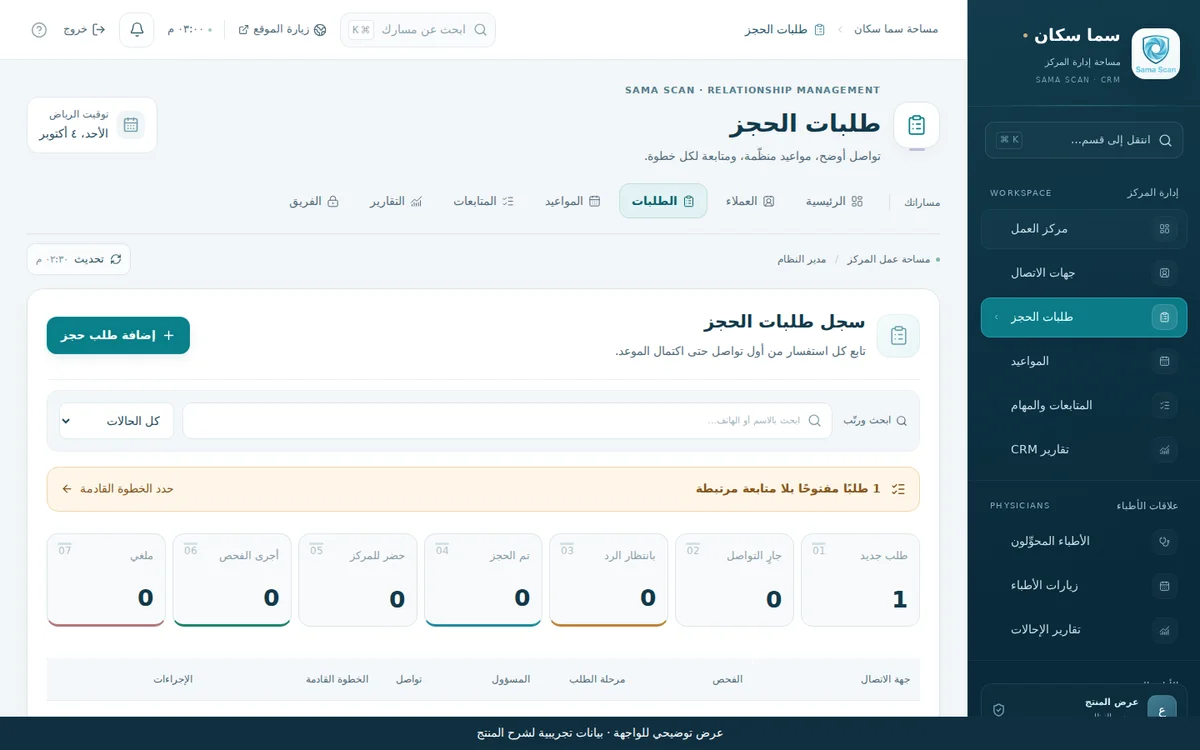
A request keeps its context after first contact.
The request list shows examination, source, stage, owner, and next action. A website submission remains a request for reception review; appointment confirmation is a separate workflow step.
- Stage, source, and owner filters
- Request and follow-up share context
- Coordinated booking with staff confirmation
THE WORKFLOW / FROM REQUEST TO NEXT ACTION
- 01Examination request arrives
- 02Reception reviews it
- 03Appointment is arranged
- 04Attendance and follow-up are recorded
Delivery scope and connections
An implemented custom product for the center's administrative operations. The tour uses demonstration data. Google summaries include dated snapshots; the content module supports preparation and review. This scope is administrative and excludes radiology images, diagnostic reporting, and billing.
Practical questions and answersReal estate
ALARGAN CRM
An interactive concept bringing customer records, opportunities, projects, and follow-ups into one product story. Sales and SAP-file import walkthroughs make proposed scope tangible.
Property-sales teams, managers, and product-scope decision makers
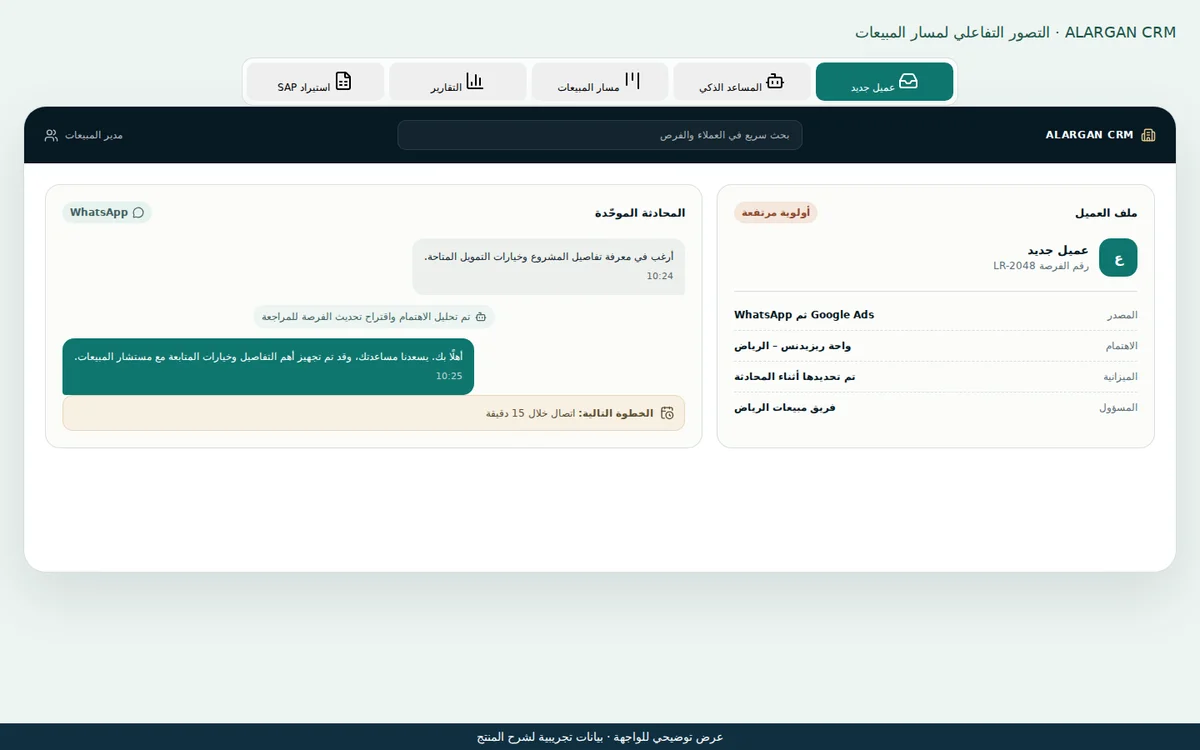
Start with the customer, then follow the opportunity.
The concept shows a sample record, communication channels, and a property need. The walkthrough is designed to discuss how these elements connect, using presentation data only.
- Customer identity at the center
- Communication linked to context
- An interactive requirements discussion
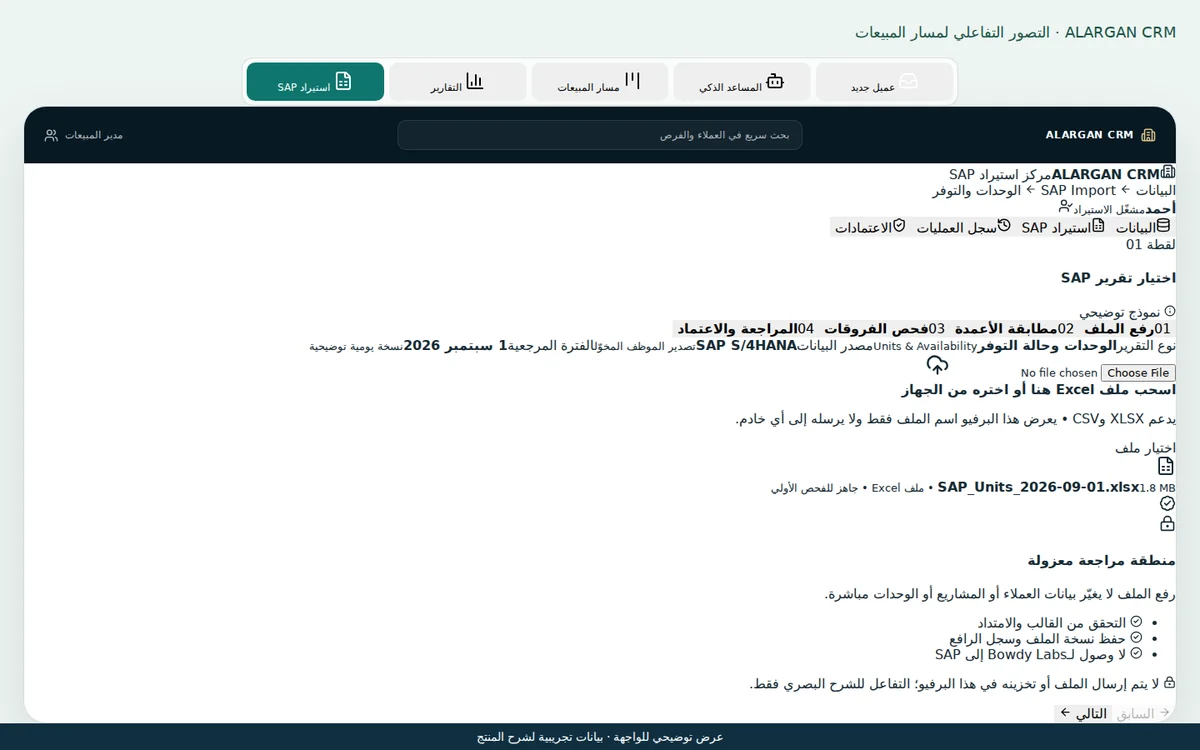
Review data before it enters the system.
The walkthrough explains export, upload, column mapping, difference checks, and review. The proposed connection is file based, rather than a direct live SAP integration.
- Visible file source and columns
- Validation before accepting updates
- Human review within the workflow
THE WORKFLOW / FROM REQUEST TO NEXT ACTION
- 01Define the customer and need
- 02Connect project and opportunity
- 03Define ownership and follow-up
- 04Review pipeline and reporting
Delivery scope and connections
A product concept and interactive proposal, rather than a published operational sales platform. Scenarios and data are illustrative; displayed functions are proposed. Integrations, roles, and operating requirements are agreed when defining the implementation scope.
Practical questions and answersContracting & services
Tawod Command Center
A custom product connecting website measurement and marketing sources with customer records, opportunities, and follow-ups. It distinguishes a contact click, a qualified opportunity, and a recorded contract.
Company managers, marketing, sales, and follow-up teams
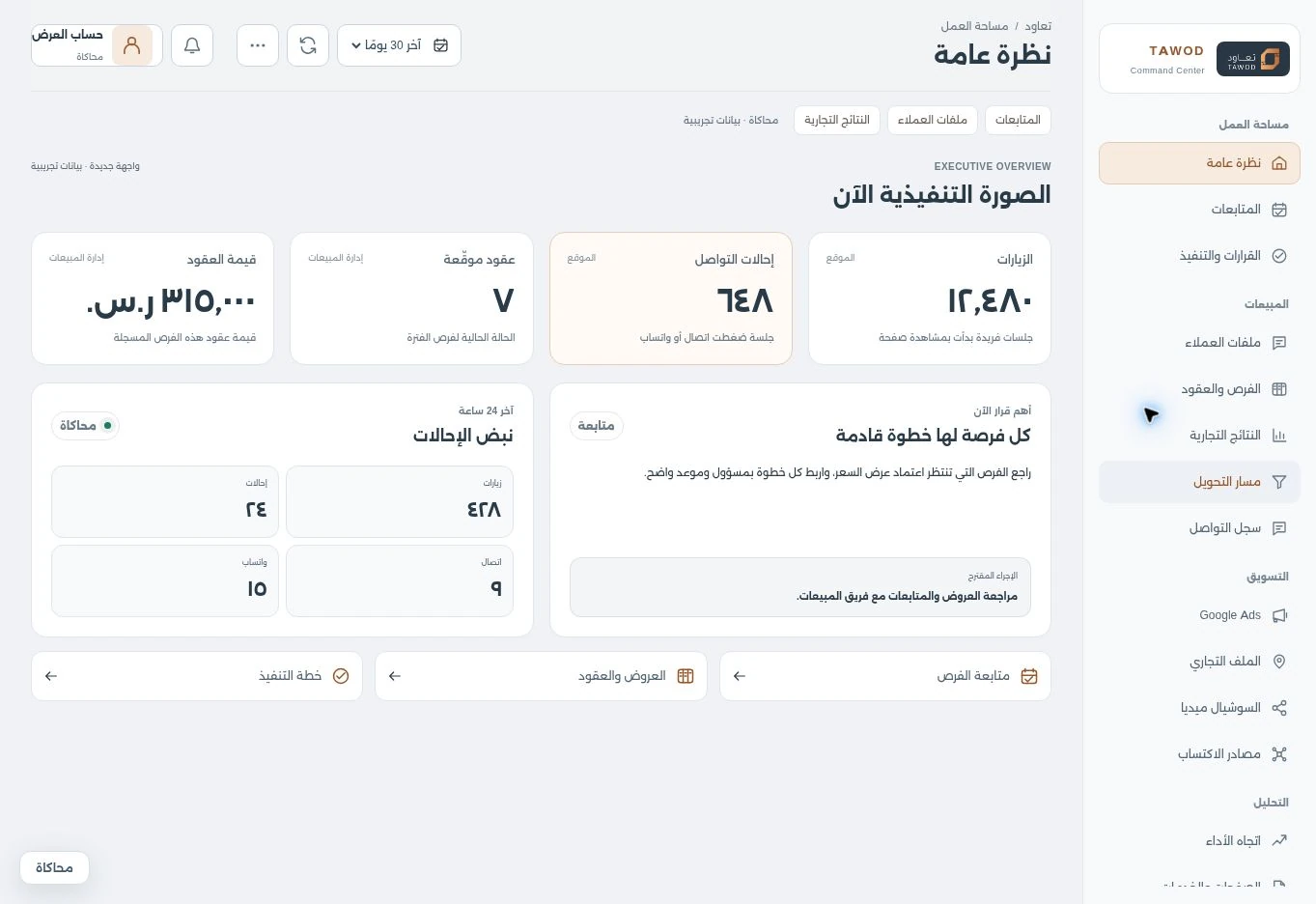
The full picture, in a clearer workspace.
Tawod's new interface brings visits, contact referrals and contracts together with a suggested action and follow-up pulse. Sources sit beside their metrics, keeping contact activity distinct from commercial outcomes.
- A light, organized workspace
- A clear source for each metric
- A decision linked to the next action
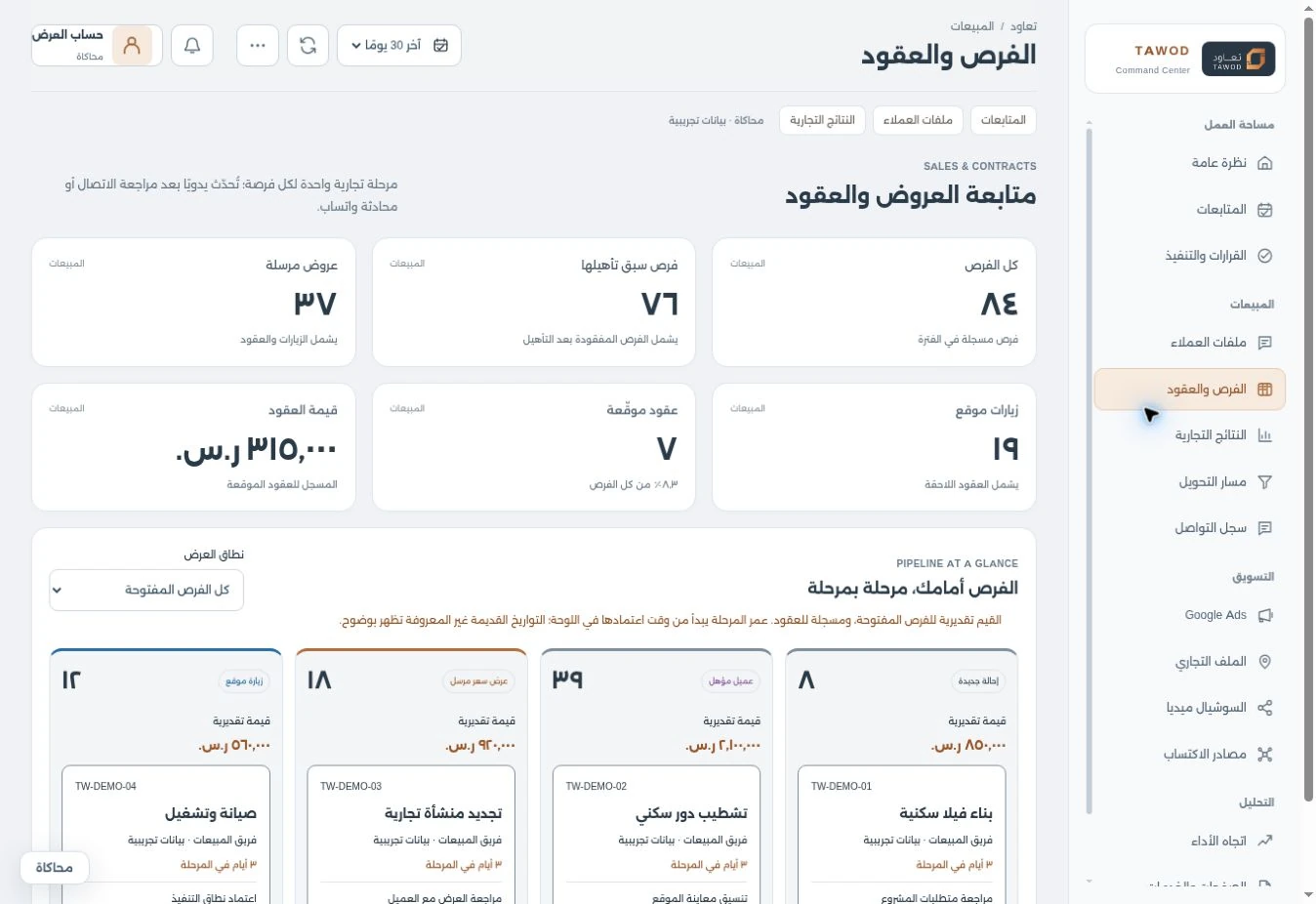
See the opportunity, stage by stage.
A sales summary leads into a board for quotes and site visits. Each opportunity retains its service, owner and next action, making follow-up handovers easier for the team.
- Opportunity, quote and contract summary
- Clear sales stages for the team
- An owner and action for follow-up
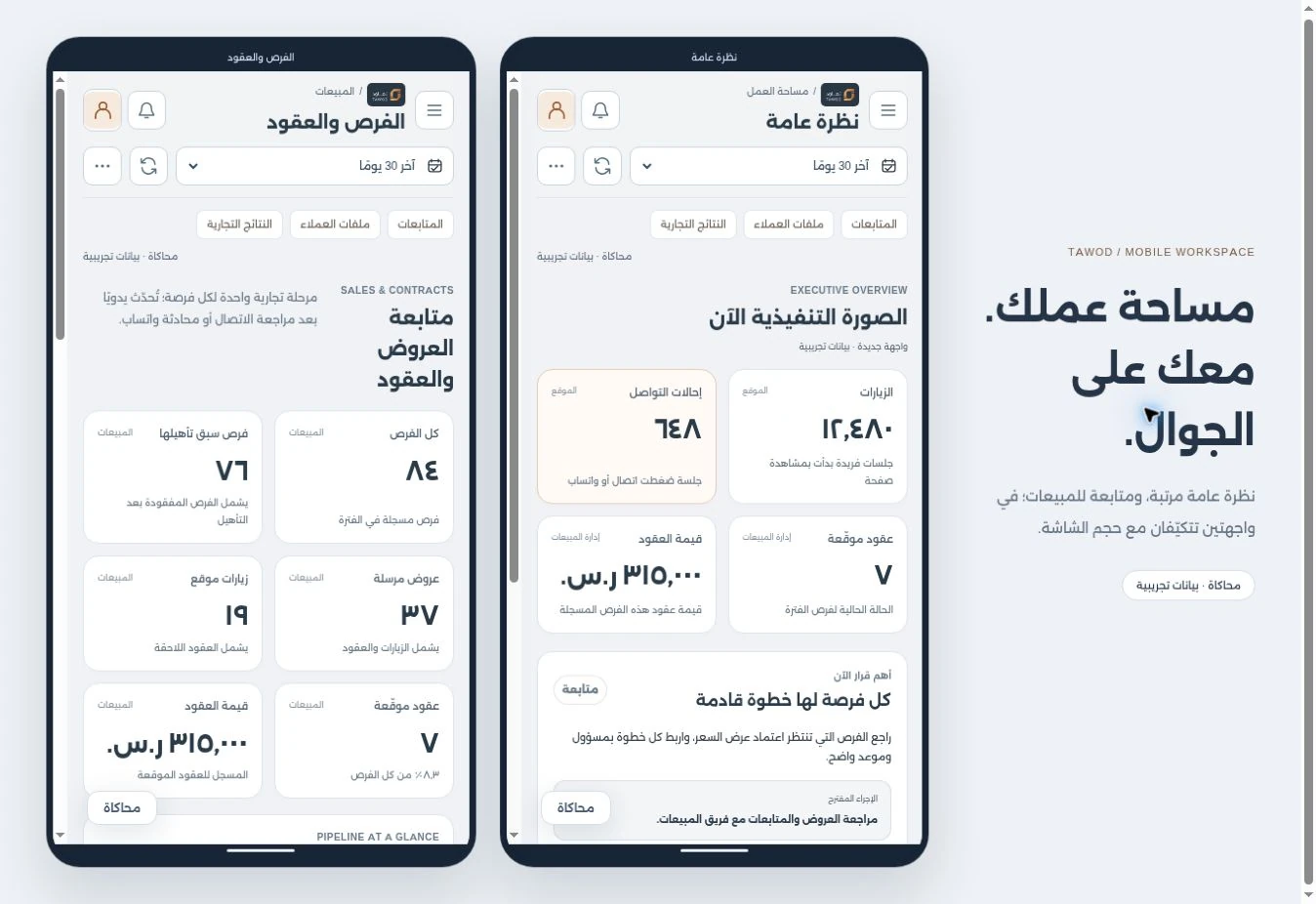
THE WORKFLOW / FROM REQUEST TO NEXT ACTION
- 01Contact referral is measured
- 02Opportunity is reviewed and qualified
- 03Follow-up and quote are recorded
- 04Outcome and source are reviewed
Delivery scope and connections
An implemented custom product within Tawod's digital system. The tour does not show actual business data. Google sources require the appropriate connection setup; social reports support imports according to available sources. Clicks, calls, opportunities, and contracts remain distinct metrics.
Practical questions and answersCafes & restaurants
Kermez Operations Center
A custom workspace connecting menu administration with daily cafe operations. Eleven modules cover the daily overview, orders, customers, menu, inventory, expenses, tasks, reports, team, activity and settings.
Cafe managers, operations staff and menu administrators
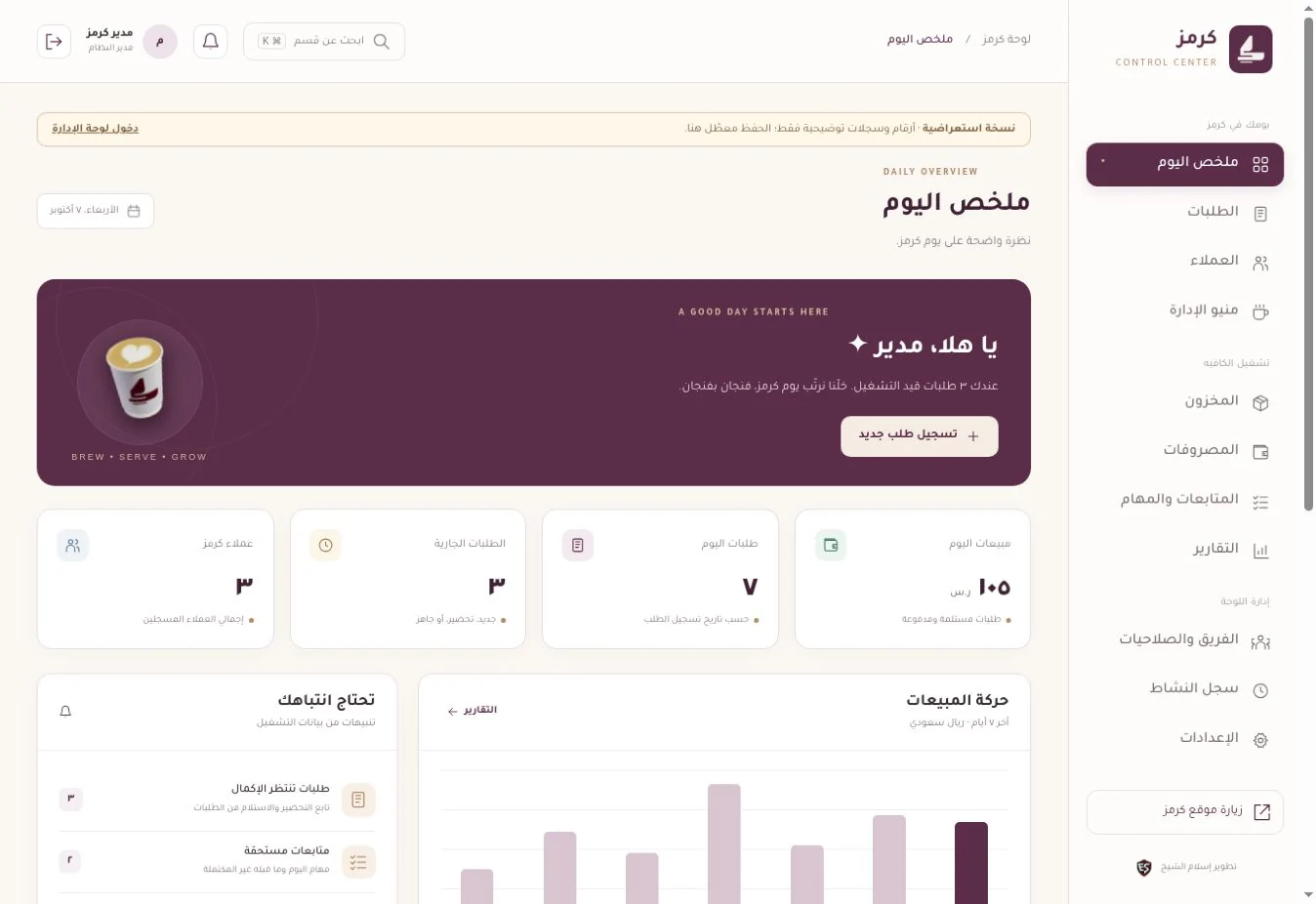
The day's picture before opening records.
Captured from the actual public demonstration, showing module navigation and the daily overview. Its figures and customers are illustrative; saving is disabled.
- Eleven modules in one workspace
- Overview and routes to orders and follow-ups
- Clearly labelled demonstration data
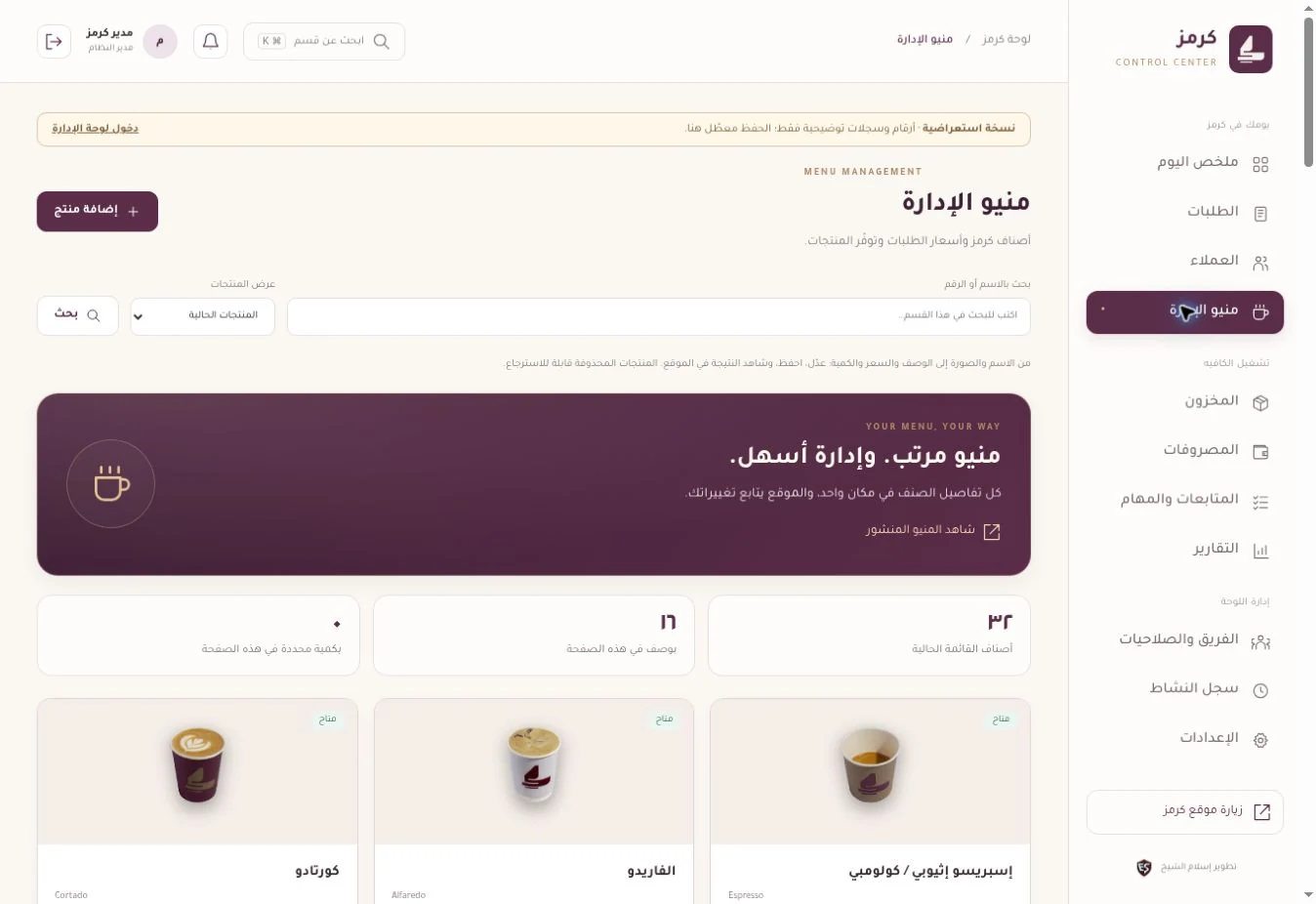
Manage item details in one place.
An interface for item imagery, names, prices and availability. This view shows demonstration records; the published menu can be inspected separately on the cafe website.
- Imagery, description, price and category
- Publication, archiving and restoration
- A public menu linked to product administration
THE WORKFLOW / FROM REQUEST TO NEXT ACTION
- 01Staff update an item
- 02It appears in the public menu
- 03Orders and follow-ups are recorded
- 04Operations records are reviewed
Delivery scope and connections
An implemented custom product, with the published version reviewed on 7 October 2026. The public demo uses illustrative records and disables saving. The booking form prepares a WhatsApp enquiry requiring cafe confirmation; it does not automatically create a booking in the workspace. Demo figures are not business performance results.
Practical questions and answersRetail & products
Alya Catalog and Product Administration
A store experience combining Alya's identity, a searchable catalog and individual product pages. Private administration manages names, imagery, descriptions, prices and publication, while products remain distinct from installation services.
Store managers and product-content staff
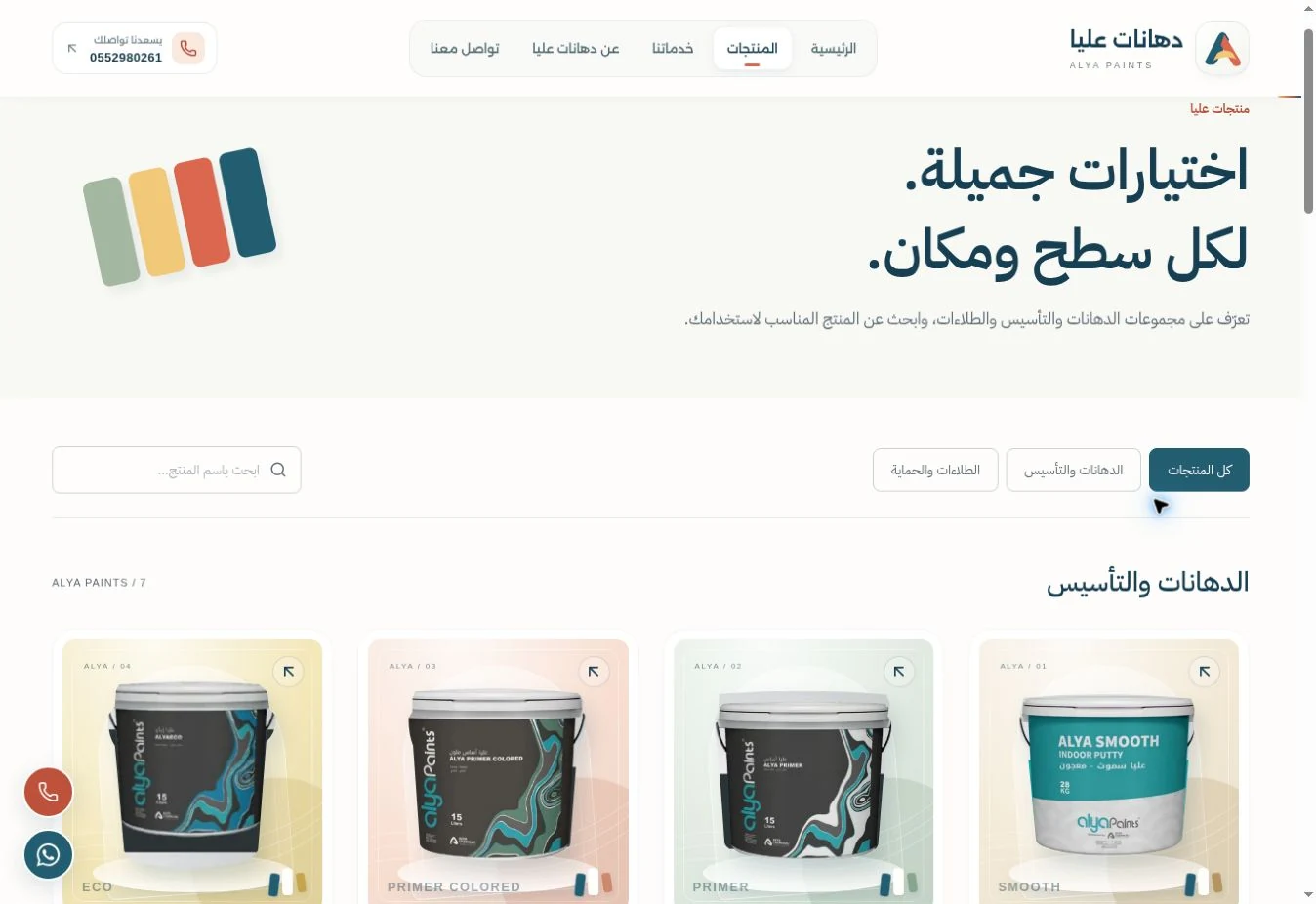
Named products with clear browsing routes.
A genuine capture of the public catalog at review, showing search, categories and product cards. The live version is linked from the case study.
- Product search and categories
- Dedicated product pages
- Thirteen published products at review
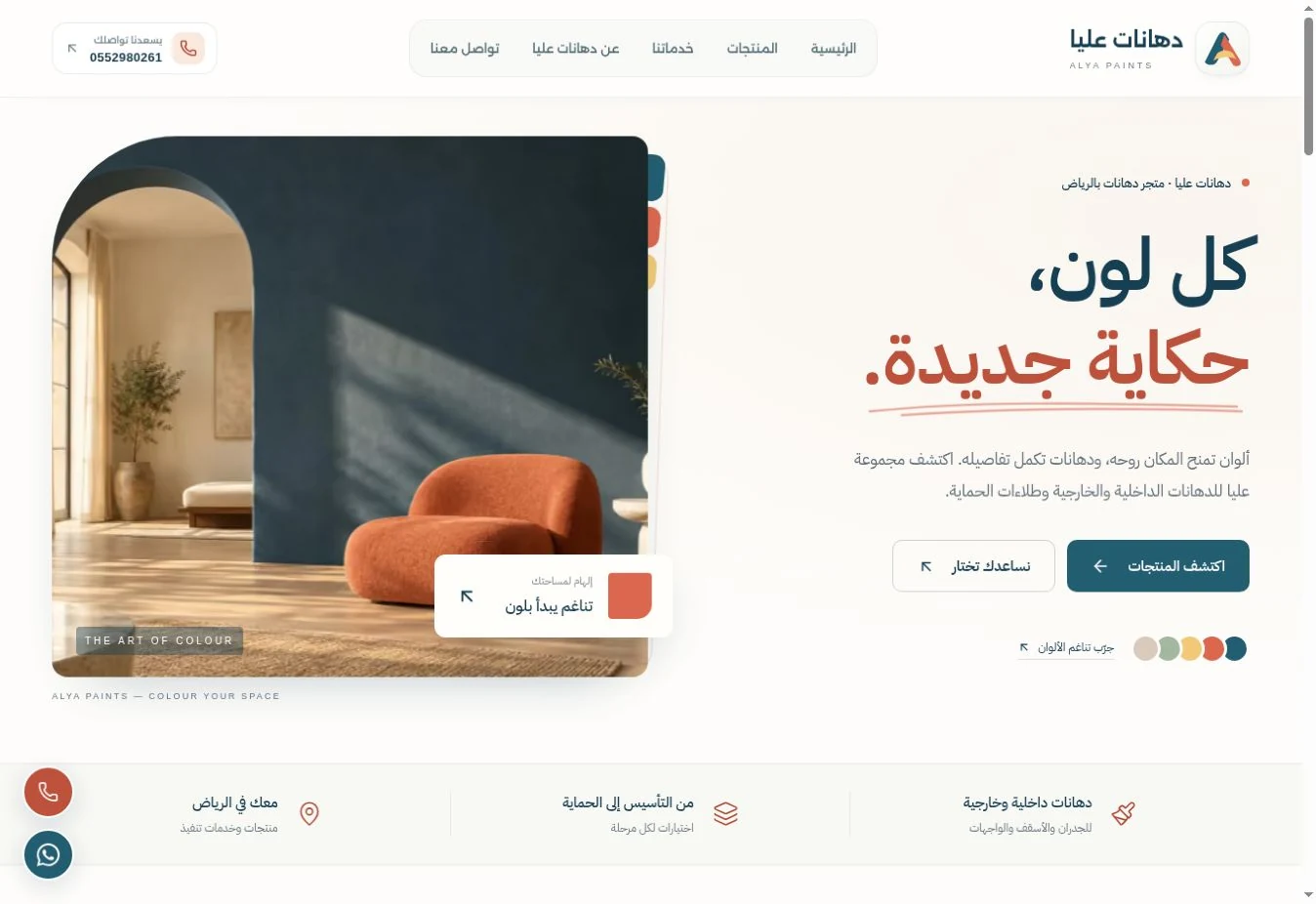
One identity for products, services and visits.
The current homepage introduces the store and routes visitors to products, services and contact. These captures show the public website; staff administration remains private and its functions are described in the delivery scope.
- The current website identity
- Products separate from installation services
- Content updates through private administration
THE WORKFLOW / FROM REQUEST TO NEXT ACTION
- 01Staff review product details
- 02Content and publication are updated
- 03Customers search the catalog
- 04They inspect a product and enquire
Delivery scope and connections
An implemented custom product. The public catalog was reviewed on 7 October 2026; administration functions were checked against project source and the user guide. Captures show the public site; staff administration is private. This scope covers catalog discovery, enquiries and content management, without online payment or purchase confirmation in the tour.
Practical questions and answersYOUR BRAND. YOUR WORKFLOW. YOUR TRIAL.
Try your system.
Before you decide.
I can prepare a working CRM trial for your business, with your identity and the workflows your team needs. A company, shop, pharmacy, hospital or another commercial activity: the starting point is how you work.
Discuss a working custom trialChoose your business context
Make the preview feel like you
PNG, JPG or WebP, up to 2 MB. The logo is displayed locally in your browser and is not attached to the request.
What should your team try first?
Your choices stay in this page. Review the message in WhatsApp before sending.
Company
Customers, opportunities and follow-up
Explore the stages of this proposed workflow
Customer intake
Start with the customer request, its source and the service of interest.
What makes the first request clearer?
Test whether a user can record and understand the request using fields agreed with your team.
Qualify opportunity
Record the need and open questions before proposing a solution.
How do we prepare for the next step?
Review missing information and who will complete it, then test movement to the appropriate stage.
Quote & follow-up
Connect the quote to an owner and a next action the team can review.
How does the team receive the task with its context?
Test whether the relevant user sees the request context, owner and next action. Actual permissions follow the agreed trial scope.
Review outcome
Record the decision and its context so the opportunity can be reviewed.
What do we review before closing the workflow?
Test recording the status and decision context, review the activity record and discuss improvements with the team.
ONE REQUEST. A CLEAR NEXT STEP.
One request. Follow it through.
Record a sample request, assign an owner and schedule its next action. Compare the team and management views.
How do I know who owns each opportunity?
Each request has an owner and a next action, while the activity record keeps its context. Your custom trial tests opportunity assignment and the stages that fit your sales process.
Shop or store
Enquiries, products and orders
Explore the stages of this proposed workflow
Customer enquiry
Keep the enquiry and the product of interest in the same record.
What makes the first request clearer?
Test whether a user can record and understand the request using fields agreed with your team.
Product & need
Define the product, requested quantity and details to check.
How do we prepare for the next step?
Review missing information and who will complete it, then test movement to the appropriate stage.
Order & follow-up
Make the owner and next action clear before confirming the order.
How does the team receive the task with its context?
Test whether the relevant user sees the request context, owner and next action. Actual permissions follow the agreed trial scope.
Update status
Update the enquiry or order status with the reason for the change.
What do we review before closing the workflow?
Test recording the status and decision context, review the activity record and discuss improvements with the team.
ONE REQUEST. A CLEAR NEXT STEP.
One request. Follow it through.
Record a sample request, assign an owner and schedule its next action. Compare the team and management views.
How can a customer enquiry stay connected to a product?
Keep the need, product, owner and follow-up status in one clear workflow. The custom trial defines whether you need product management, order connections or an integration with your store.
Pharmacy
Enquiries and administrative follow-up
Explore the stages of this proposed workflow
Receive enquiry
Start with a test-data administrative enquiry about a pharmacy service.
What makes the first request clearer?
Test whether a user can record and understand the request using fields agreed with your team.
Review request
Review the enquiry and the appropriate administrative team.
How do we prepare for the next step?
Review missing information and who will complete it, then test movement to the appropriate stage.
Assign owner
Assign the enquiry to an agreed staff role.
How does the team receive the task with its context?
Test whether the relevant user sees the request context, owner and next action. Actual permissions follow the agreed trial scope.
Record follow-up
Record the administrative reply, next action and enquiry status.
What do we review before closing the workflow?
Test recording the status and decision context, review the activity record and discuss improvements with the team.
ONE REQUEST. A CLEAR NEXT STEP.
One request. Follow it through.
Record a sample request, assign an owner and schedule its next action. Compare the team and management views.
What can pharmacy staff try here?
Organize an administrative enquiry, assign it and record the next action using test data. Specialist requirements and health integrations need a separate agreed scope before inclusion in the working trial.
Hospital or center
Reception, scheduling and administrative follow-up
Explore the stages of this proposed workflow
Appointment request
Reception records an illustrative appointment enquiry using test data.
What makes the first request clearer?
Test whether a user can record and understand the request using fields agreed with your team.
Reception review
Review the coordination details within the administrative scope.
How do we prepare for the next step?
Review missing information and who will complete it, then test movement to the appropriate stage.
Arrange & confirm
Make the coordinating role and proposed confirmation step clear.
How does the team receive the task with its context?
Test whether the relevant user sees the request context, owner and next action. Actual permissions follow the agreed trial scope.
Request follow-up
Update the appointment enquiry status and next administrative action.
What do we review before closing the workflow?
Test recording the status and decision context, review the activity record and discuss improvements with the team.
ONE REQUEST. A CLEAR NEXT STEP.
One request. Follow it through.
Record a sample request, assign an owner and schedule its next action. Compare the team and management views.
How does the trial help reception staff?
It shows how an appointment enquiry moves between reception and the follow-up owner, with a recorded next action. This is an administrative simulation; your custom trial agrees the tasks, permissions and connections for your organization.
Contracting or services
Service requests, opportunities and quotes
Explore the stages of this proposed workflow
Service request
Record the service, initial project location and customer request.
What makes the first request clearer?
Test whether a user can record and understand the request using fields agreed with your team.
Qualification & visit
Record site-visit requirements and questions to resolve before quoting.
How do we prepare for the next step?
Review missing information and who will complete it, then test movement to the appropriate stage.
Quote & follow-up
Connect the quote to its owner and the details that need follow-up.
How does the team receive the task with its context?
Test whether the relevant user sees the request context, owner and next action. Actual permissions follow the agreed trial scope.
Record decision
Record the customer decision and the agreed next step.
What do we review before closing the workflow?
Test recording the status and decision context, review the activity record and discuss improvements with the team.
ONE REQUEST. A CLEAR NEXT STEP.
One request. Follow it through.
Record a sample request, assign an owner and schedule its next action. Compare the team and management views.
How can I follow a request from a site visit to a quote?
Assign an owner, record the visit and next action, then connect them to quotation and follow-up stages. Your custom trial tests that workflow against your services and actual team roles.
Another business
A workflow shaped around your business
Explore the stages of this proposed workflow
Receive request
Start with a recurring request and the information needed to understand it.
What makes the first request clearer?
Test whether a user can record and understand the request using fields agreed with your team.
Define need
Define the need and the questions your team must resolve.
How do we prepare for the next step?
Review missing information and who will complete it, then test movement to the appropriate stage.
Take next action
Make the task, owner and completion record clear.
How does the team receive the task with its context?
Test whether the relevant user sees the request context, owner and next action. Actual permissions follow the agreed trial scope.
Review status
Review the status and next action against your business workflow.
What do we review before closing the workflow?
Test recording the status and decision context, review the activity record and discuss improvements with the team.
ONE REQUEST. A CLEAR NEXT STEP.
One request. Follow it through.
Record a sample request, assign an owner and schedule its next action. Compare the team and management views.
Can this workflow be adapted to my business?
Start with a task your team repeats, then define the information, roles and stages needed to complete it. The working trial follows your agreed requirements, including the modules and connections you need.
Customers & requests · Stages & follow-up
This preview shapes the brief. A working trial is prepared after we agree its tasks, scope, timing and commercial terms.
Your trial brief
Review the request in WhatsAppDefine
We agree the task, roles, identity and trial scope.
Try
Your team tests the agreed tasks in a working version using test data.
Refine
We review feedback before approving the full implementation scope.
What is the scope for pharmacies and healthcare businesses?
The starting scenarios here cover enquiries, reception and administrative follow-up using test data. Medical records, diagnosis, prescribing, dispensing and links to health systems need separate specialist requirements and an agreed scope.
FROM PROCESS TO PRODUCT
Designed with context.
Delivered with a clear scope.
The build starts with a real task, its users and its information. Interface design, implementation, testing and handover follow that understanding.
Understand
Map the users, daily tasks, information and points where context is lost.
Design
Agree stages, roles and screen scenarios before implementing the system.
Build & connect
Implement agreed modules and assess website, measurement or file-import connections.
Test & hand over
Verify core tasks, define permissions and explain how the team uses the delivered scope.
A scope you can review
These workstreams are agreed according to your needs; each proposal defines its modules and deliverables.
- Workflow, data-model and access design
- Customer, request, opportunity and follow-up modules
- Scoped operations, product and reporting dashboards
- Website, measurement and import assessment
- Core-task testing and team handover
BEFORE YOU DECIDE
The right questions.
A clearer scope.
Practical answers on custom CRM development, integrations, pricing and delivery in Saudi Arabia.
01Can my team try a working CRM with our brand before the full build?
Yes. A working trial can be prepared with your business name, logo, colors and agreed workflows, roles and tasks. Your team tests it using test data, then we review feedback. Trial scope, timing and commercial terms are agreed before preparation; the page preview helps define the request.
02When does a custom CRM make sense?
When your team needs a specific connection between customers, requests, opportunities and follow-ups that existing tools do not support well. We first review whether a custom build or an existing product best fits the workflow.
03What is decided during system design?
Users, roles, stages, data, sources, validation and integrations are agreed through interfaces and scenarios. Core tasks are then tested on mobile and desktop against the delivery scope.
04How is a custom CRM or dashboard priced?
By modules, workflow detail, permissions, integrations, migration and support. Implementation is distinguished from recurring hosting and external-service costs; a screenshot alone cannot establish a fair price.
05Can the system connect to my website and measurement tools?
Each source is assessed for connection options, permissions and refresh needs. The route may be a request form, integration or file import, depending on the available system.
06Can a similar experience be tailored to my business?
The showcased workflow patterns guide a new scope for your team. Four experiences are implemented and ALARGAN is an interactive concept; Alya is product administration rather than a complete CRM.
YOUR BUSINESS / YOUR WORKFLOW
Let’s connect
the next step in your work.
Describe the team, the task and the information it needs. We will use that context to discuss a system with a clear delivery scope.
Discuss your system